The laptop was closed. The AI kept reading.
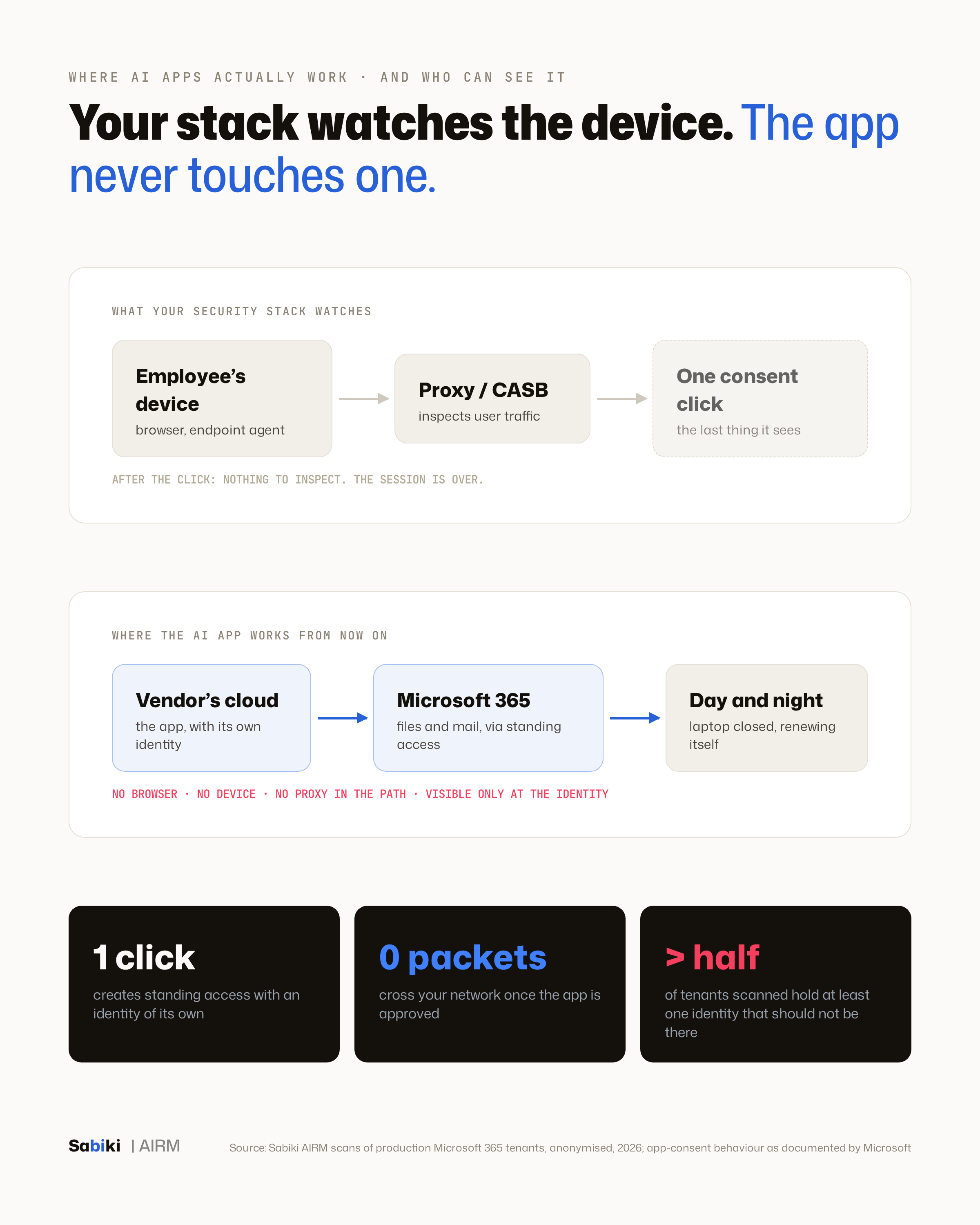
In 30 seconds
- When an employee connects an AI tool to Microsoft 365 and clicks Accept, the app gets an identity of its own in your tenant and standing access it can keep renewing.
- The app works from the vendor’s cloud straight to Microsoft. No browser, no device, no traffic for a proxy-based CASB or an endpoint tool to inspect.
- In more than half of the tenants we scan, at least one non-human identity should not be there. Nobody had noticed, because nothing they owned was looking in the right place.
Picture a Tuesday morning. An employee connects a new AI tool to Microsoft 365. A consent screen appears and they click Accept. That click is the last thing your web security tools will see. From that moment the app holds its own access to that person’s files and mail, working from the vendor’s cloud, straight to Microsoft. The laptop can be closed, left at home or switched off. The app keeps working.
One click, standing access
Approving an app does more than open a session. It creates lasting access inside your tenant.
- The app gets an identity of its own. Microsoft 365 records the approval, and the app now exists in your tenant as a non-human identity.
- It can keep renewing its access. Most apps ask for a permission to maintain access. Microsoft describes that permission as letting the app reach the data it was given even when the person is not using the app.
- Some apps need no person at all. With an administrator’s approval, an app can hold permissions that are not tied to any user. Microsoft intends these for services that run in the background.
None of this is a flaw. It is how connected apps are designed to work. The question is who is watching once the access exists.
Why a proxy cannot see it
A proxy-based CASB inspects traffic between your people’s devices and the internet. Endpoint tools watch the device itself. The AI app’s activity starts in the vendor’s cloud and ends at Microsoft. It never crosses your network and never touches a device you manage.
| What happens | Proxy-based CASB | Endpoint tool | Identity inside Microsoft 365 |
|---|---|---|---|
| Employee opens the AI tool and clicks Accept | Sees the visit | Sees the browser | Records the approval |
| The app works overnight from the vendor’s cloud | Nothing to inspect | Nothing to inspect | Activity sits against the app’s identity |
| The app still has access six months later | No record | No record | Listed, with who approved it |
One caveat. Some CASBs also connect to Microsoft 365 by API and can list the apps that have been approved. That is an inventory, and it is useful. It is not the same as seeing what an app does: those calls run server to server and do not pass through the user’s session, so a CASB does not intercept them.
Watch the identity, not the traffic
The one place this activity is visible is inside Microsoft 365, at the identity the app was given. That is where Sabiki AIRM looks. For every agentic identity in the tenant, AIRM shows who approved it and when, what it is permitted to reach, which person is driving it or whether it acts alone, the activity recorded against it, and whether anyone owns it or has reviewed it. Then you can act: decide who may use each identity, narrow it to the SharePoint sites and mailboxes it needs, or switch it off in one click.
There is nothing to install on a device and no proxy in the path.
Five questions to ask this week
- How many third-party AI apps hold standing access to our Microsoft 365 today?
- Who approved each one, and when?
- What can each one reach: one person’s files, or every mailbox in the company?
- When was each one last active, and was anyone at work at the time?
- If one had to be switched off right now, who could do it, and how long would it take?
Your CASB can tell you which AI tools your people visit. It cannot tell you which ones stayed.
About the data
The tenant finding comes from Sabiki AIRM scans of production Microsoft 365 tenants, anonymised. App consent and permission behaviour is as documented by Microsoft; the CASB architecture point is consistent with independent industry analysis. We are not claiming a vulnerability in any product.
The free AI Readiness Assessment is the quickest way to see which apps hold standing access to your tenant, who approved them, and what they can reach: over 100 checks, scored 0–100. Agentless, and it works on E3 and Business Premium.
Get your free AI Readiness Assessment