Your colleague’s AI is reading your OneDrive, and Microsoft doesn’t tell you
In 30 seconds
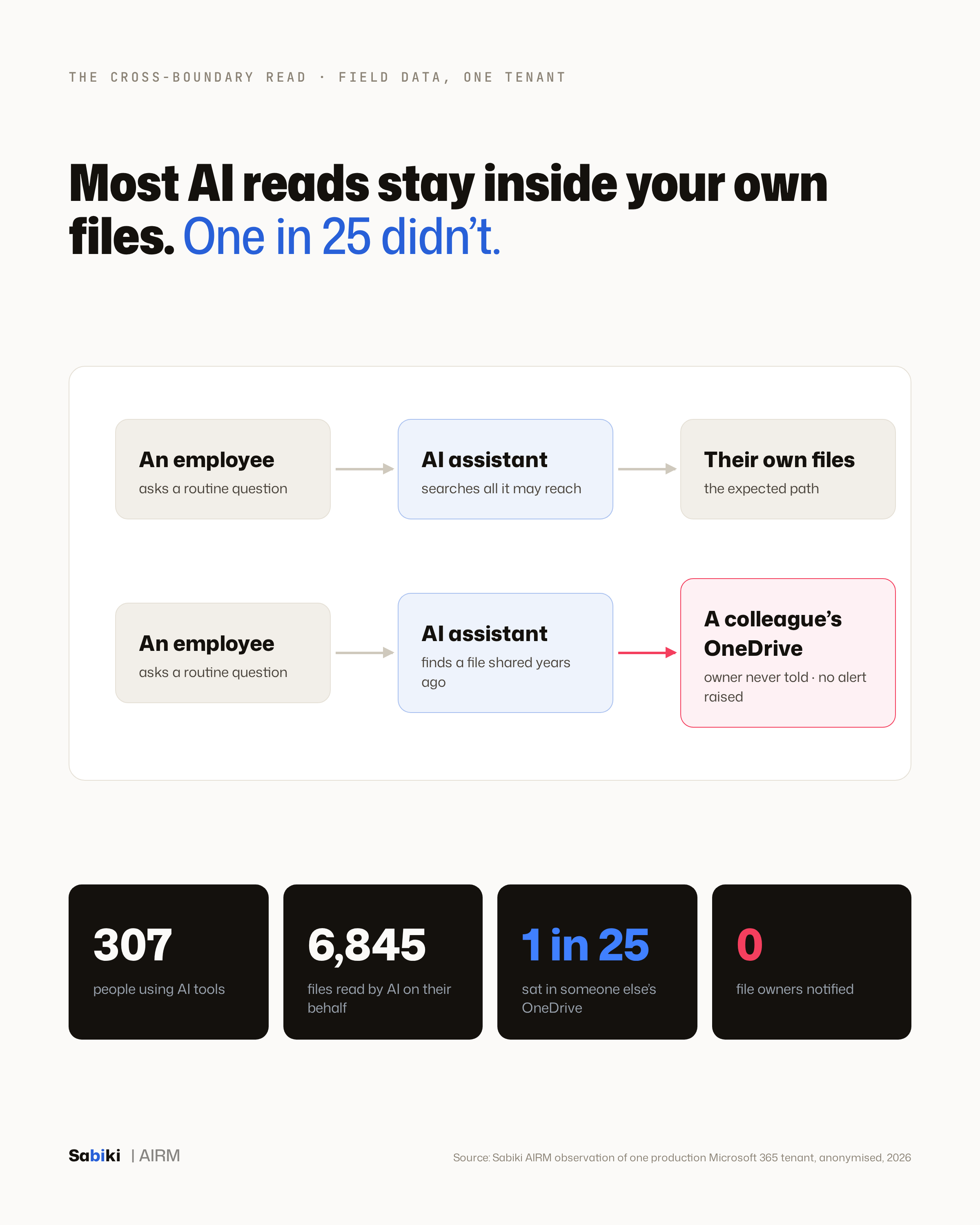
- In one Microsoft 365 tenant, AI read 6,845 files on behalf of 307 people. 1 in every 25 of those files sat in someone else’s OneDrive. We call that a cross-boundary read.
- By Microsoft’s rules nothing went wrong: the file was shared once, years ago, so the permission check passed. There is no violation to alert on, and nobody is told.
- The evidence exists in the audit data, but assembling it by hand means exporting, unpacking JSON and matching every file to its owner, every week.
In a real Microsoft 365 tenant, an employee asked their AI assistant a routine question. To answer it, the assistant read a software licensing workbook stored in a colleague’s OneDrive. The employee never opened that file. They may not have known it existed. Nothing was blocked, and nothing was flagged.
What a cross-boundary read is
A cross-boundary read happens when an AI assistant, working for one person, reads a file that lives in another person’s OneDrive.
It is worth being precise about what it is not. It is not a breach: the file was shared in a way that allowed access, so the AI was allowed to read it. And it is not personal data mixing with company data: OneDrive for Business is company storage that happens to be assigned to one employee.
It is a sharing-hygiene finding. At some point a file or folder was shared more widely than its owner remembers. For years that rarely mattered, because nobody went looking. AI goes looking on every prompt.
There is a people problem here too. The record of that read carries the name of the employee who asked the question. They did not pick the file, and they may never have seen it.
Your colleague never opened your file. You were not told it was read.
What we found in one tenant
- People using AI tools: 307
- Files AI read on their behalf: 6,845
- Read from someone else’s OneDrive: 1 in every 25, roughly 270 reads
- People told about any of them: 0
The rate varies. A smaller tenant, with 205 people using AI, came in closer to 1 in 75 over a week. Your figure depends on how your people have shared files over the years.
Why Microsoft does nothing about it by default
By Microsoft’s rules, nothing went wrong. Copilot honours existing permissions: Microsoft’s own guidance says it only surfaces data a user already has at least view access to, and the same guidance warns this can include broadly shared files the user did not know about. The permission check passes, the file is read, the answer comes back. There is no violation to alert on.
Microsoft does provide tools for the underlying problem. SharePoint Advanced Management can report on sites with potentially overshared content, and sensitivity labels can restrict what AI may use. Both are clean-up projects someone has to plan, license, run and maintain. Neither tells you that on Tuesday one person’s AI read a named file from a named colleague’s OneDrive.
Oversharing is treated as a setting to fix, not as an event to see.
Finding one by hand
The evidence exists inside Microsoft 365, but nothing assembles it for you. To find one cross-boundary read yourself: search the audit data for AI interactions, export the results because the portal cannot filter by file, unpack the JSON detail of every interaction, strip out the web pages, which are most of what AI touches, match every remaining file to its owner, compare that with who asked, and then separate intended sharing from accidental. Then do it again next week.
That last step is where attempts fail. A rough rule we tested over 30 days flagged 64 reads; on review, most were intended sharing between project teams. Telling those apart from the handful that matter is the real work.
What to do with a finding
Each cross-boundary read ends one of three ways. The sharing was intended: mark it as expected and move on. The sharing was a mistake: the owner removes the link or permission, fixing it at the source rather than in the AI. Or it keeps happening in one place: restrict that site or OneDrive so AI cannot draw on it.
AI did not create the oversharing. It made years of it reachable in seconds, by anyone who asks the right question.
About the data
The figures come from production Microsoft 365 tenants observed by Sabiki AIRM in 2026 and anonymised. They describe those tenants only; your rate depends on your sharing history. Copilot’s permission behaviour is as documented by Microsoft. We are not claiming a vulnerability in any Microsoft product.
The free AI Readiness Assessment is the quickest way to see your own numbers: what AI is reading in your tenant and on whose behalf, plus over 100 checks scored 0–100. Agentless, and it works on E3 and Business Premium.
Get your free AI Readiness Assessment