How do you kill an AI agent you don’t know exists?
In 30 seconds
- 153 AI agent identities appeared in one Microsoft 365 tenant in a single day. Microsoft created them, as designed, when an admin enabled a Dynamics 365 feature.
- None of the tenant’s 168 Copilot Studio identities carried an Entra Agent ID, so Microsoft’s own agent security treats them as ordinary applications.
- Shutting one down takes three things most tenants lack: knowing it exists, knowing whose it is, and switching it off without breaking the business.
One morning a real customer’s Microsoft 365 tenant had 153 more AI agent identities than it had the day before. Nobody at the company built them. Nobody knew who owned them. And if one of them had needed shutting down that afternoon, nobody could have done it. Here is what we found.
153 agents arrived overnight. The company had built two.
The tenant belongs to a mid-sized organisation rolling out Copilot. When Sabiki AIRM listed its agentic identities, 168 carried the Copilot Studio label. As far as anyone there knew, the company had built a couple of agents, not a fleet.
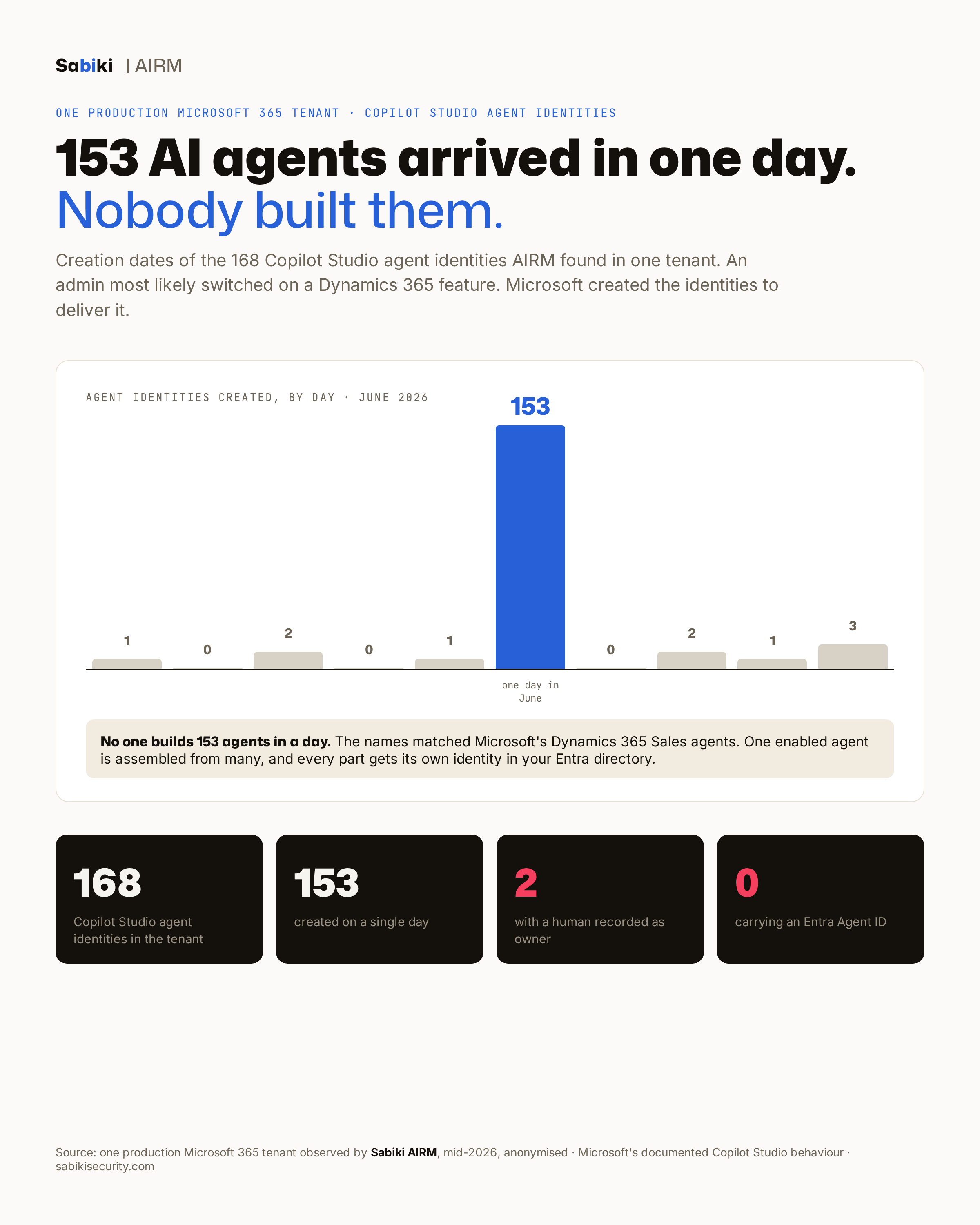
The creation dates told the story: 153 of the 168 appeared on the same day in June.
- Copilot Studio agent identities in the tenant: 168
- Created on a single day: 153
- Owner recorded as a human admin: 2
- No owner recorded at all: 47
- Carrying an Entra Agent ID: 0
No one builds 153 agents in a day. Something else did.
Microsoft did.
The names gave it away: sales close, custom research, account reconciliation. Not the company’s names. They matched the agents that ship with Dynamics 365.
Microsoft documents the mechanics. A Dynamics 365 Sales agent is not one agent; it is assembled from skill-based agents in Copilot Studio, and every part gets its own app registration in Entra, with credentials Microsoft creates, holds and rotates. The Sales Qualification Agent alone is made of 12. Enable it in 5 environments and Microsoft’s own example says you get 60. The owner recorded on each one is a Microsoft service, Power Virtual Agents Service, not a person.
So the likely story here is mundane: an admin switched on a feature, and Microsoft created 153 identities inside the company’s directory to deliver it. We did not see the click, but the names, the single-day batch and the Microsoft service in the owner field all point the same way.
Nothing went wrong. This is the product working as designed.
Microsoft’s agent security does not cover them
Microsoft has spent a year building security for AI agents: Entra Agent ID, Conditional Access for agents, ID Protection, an agent registry. None of the 168 identities carried an Agent ID. Microsoft’s own migration guidance says Entra treats them “as standard applications, not as AI agents”, which means no Conditional Access enforcement, no lifecycle governance, no agent audit trail, no registry entry.
Microsoft built these agents, and Microsoft’s agent protections were not built for them. A migration is promised in a future update. Until then the documented fix is to recreate each agent by hand, monitor it for up to two weeks, and retire the old one.
So how do you kill one?
Sooner or later one of these will need switching off: it misbehaves, its project dies, or an auditor asks why it exists. That takes three things. This tenant had none of them, and AIRM was built to answer all three before you need them.
- Know it exists. Entra files these among every other app in the directory; nobody here had gone looking, because nobody knew there were 153 to find. AIRM’s answer: every agentic identity in the tenant, Agent ID or not, with the day it arrived. A batch of 153 shows up as a batch of 153.
- Know whose it is. The owner field says Power Virtual Agents Service, or nothing, and asked who was accountable for 168 agents, this tenant could name a person for two. AIRM’s answer: the estate split by origin, Microsoft’s own, Copilot Studio, third-party, with every ownerless identity flagged and an owner assignable on the spot.
- Switch it off without breaking the business. Microsoft warns that deleting the app registration before the agent is unpublished breaks it; remove the wrong one, or the right one in the wrong order, and a live sales process goes down with it. AIRM’s answer: restrict, narrow or revoke from one place, with every change staged off until an admin flips it, so you see the effect before anything breaks.
Without that, the honest answer to the question in the title is: slowly, across several admin consoles, and carefully, for every customer tenant you manage, with the list growing every time someone enables a feature. The point of doing it with tooling instead: “168 agents, origin unknown” becomes a register you can act on.
Buried in the 168 were the two agents this company actually built. If one of those ever needs stopping in a hurry, it is hiding behind 166 others.
About the data
The figures come from one production Microsoft 365 tenant, observed by Sabiki AIRM in mid-2026 and anonymised. They describe that tenant only. The explanation for the single-day batch is our reading of the evidence, based on the identity names, their owner and Microsoft’s documented behaviour. We are not claiming a vulnerability in any Microsoft product.
The free AI Readiness Assessment is the quickest way to see your own numbers: every agentic identity in your tenant, who owns it, and over 100 checks scored 0–100. Agentless, and it works on E3 and Business Premium.
Get your free AI Readiness Score